The AI skill kids will use their whole life.
Your kid talks to Spark and builds real things with AI — games, flashcards, study tools, posters, image projects, trackers. They learn to direct AI— ask clearly, check the output, iterate, ship. The most important skill they'll learn this decade.
Parent is the account holder
No data sold, ever
Designed for ages 10–13
Works on any device
Why this matters now
Kids who learn AI early get a real career head start.
In five years, directing AI well will be a baseline skill — like writing a coherent email today. SafeSpark gives kids a safe place to practice now, before bad habits form on random chatbots and TikTok filters. They're not just consuming AI. They're directing it.
Future-proof careers
Every white-collar job in 5 years will require AI fluency. They'll have a 7-year head start.
Real AI habits
Clarify, iterate, own the output. The skills schools haven't figured out how to teach yet.
Confidence to make
Going from idea → working thing in minutes turns kids into authors, not consumers.

What kids make
Real projects, in seconds.
Six one-tap templates get them started. After that they ask for anything in plain words.
Games
"Make a Pokemon battle game" → playable in seconds. Add a boss, sounds, score — it just iterates.
Flashcards & Quizzes
"Flashcards for state capitals" → ready to study with. Real facts pulled from Wikipedia, not made up.
Posters
"Poster for my lemonade stand" → print it on real paper from the browser, ready for the table.
Trackers & Apps
"Habit tracker I can use today" → saves data so it remembers tomorrow. Real tiny app, not just a chat.
Photo restyles
Upload a photo → "make me a Pixar character" → AI repaints the face. Cartoon, anime, Lego, comic-book.
Anything else
Story tools, sound boards, name generators, drawing apps, outfit pickers, calculators, recipe finders…
Make it. Share it.
Real projects kids can send to anyone.
Every project — a study tool, a lemonade-stand poster, a flashcard set, a game for a friend — gets a short, kid-readable share link the kid can hand to grandma. Friends and family open it on any browser. No login. No download.
- 1Vibe code it in plain words — “make flashcards for state capitals” or “a poster for my lemonade stand.”
- 2Iterate — “add multiple choice,” “make the headline bigger.” That's the real AI skill.
- 3Share or print. Send the link to a teacher, a grandparent, a friend — or hit Print for the fridge.
Private by default. No public gallery, no comments, no follower counts — only the people your kid sends the link to can see it.
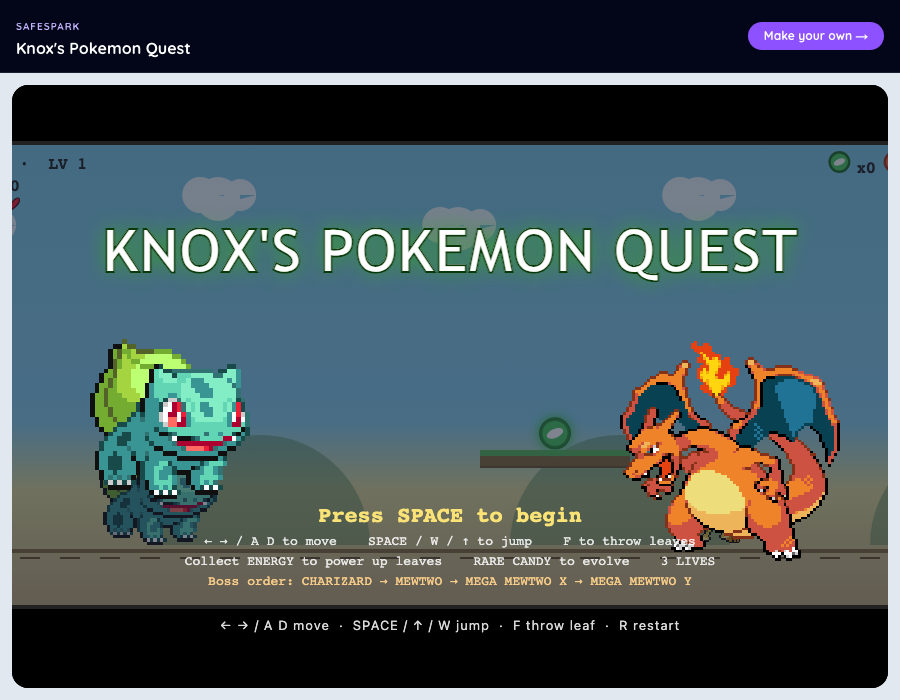
What grandma sees when Knox sends her the link
Real kids, real projects
Here's what kids are building.
Tap to play the shareable ones. Every one was built by typing or talking to Spark — no code editor, no copy-paste.
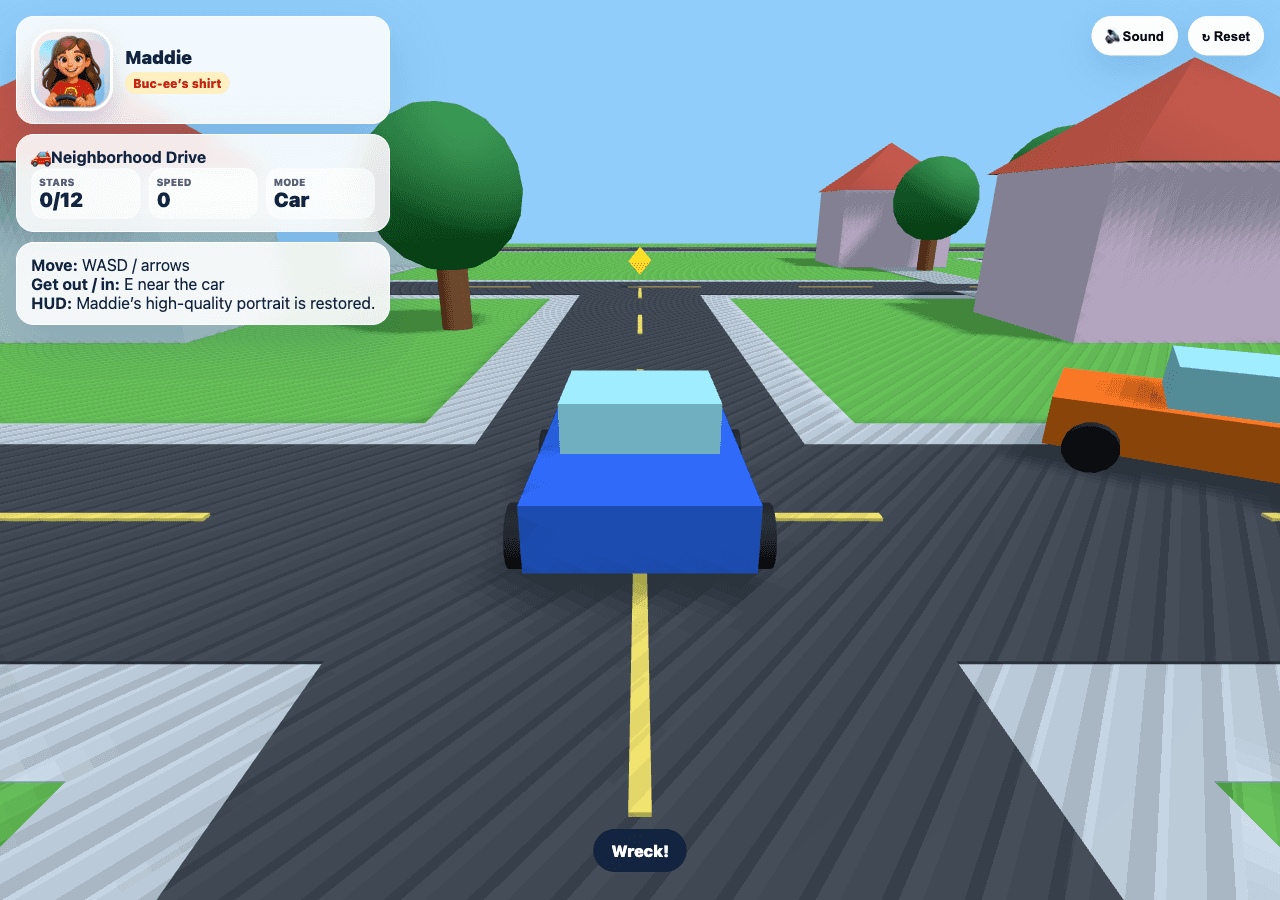
Neighborhood Drive
Sara, age 6
A real 3D driving game built with Three.js — blue car, chase camera, houses with red roofs, a giraffe walking around, and a HUD showing the driver. Tap to play.
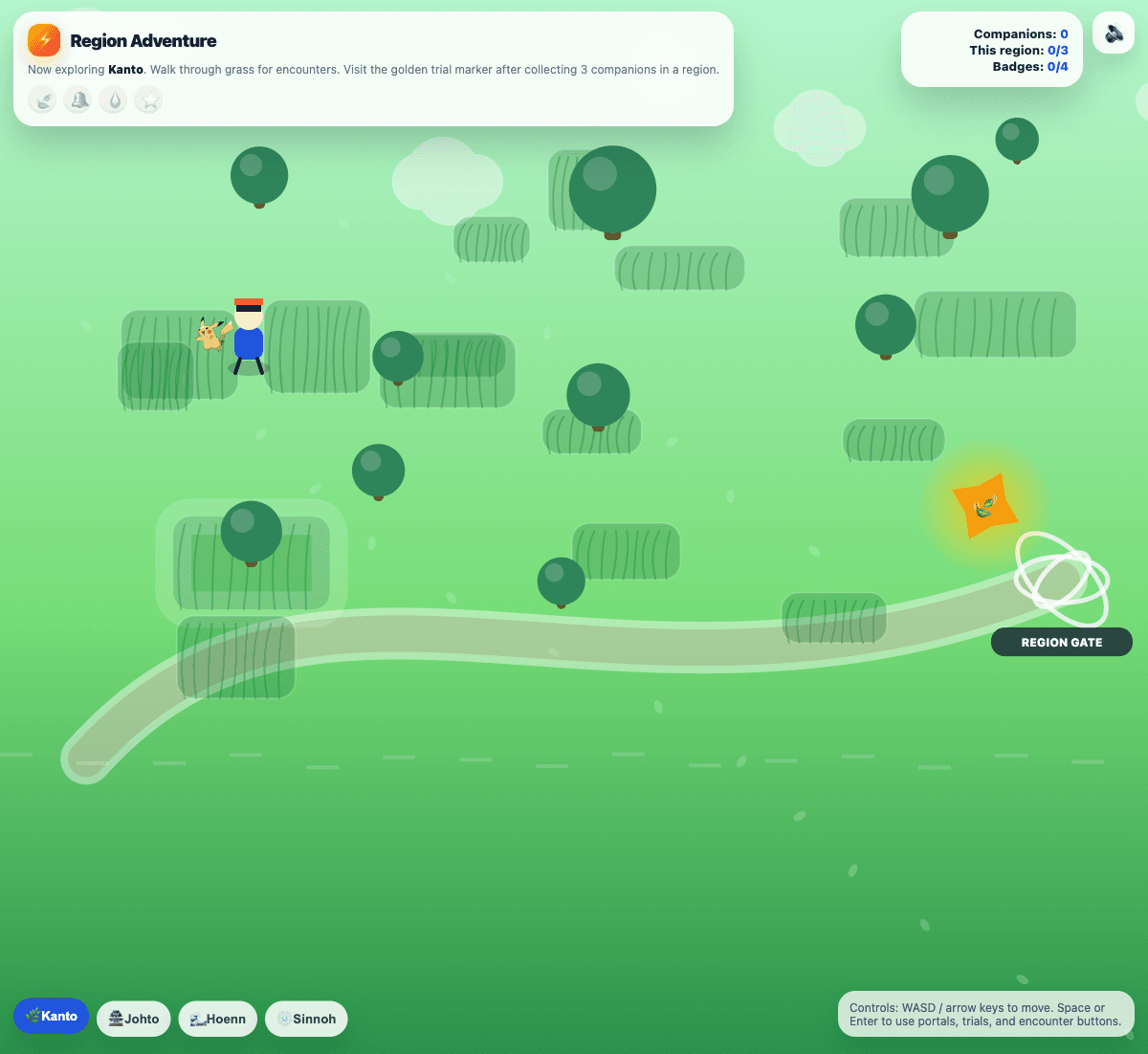
Pokémon Region Adventure
Knox, age 11
A walk-around region game with travel between Kanto, Johto, Hoenn, and Sinnoh — wild encounters, companions, badges to earn, particles, sound. Real characters and tile maps, not text.
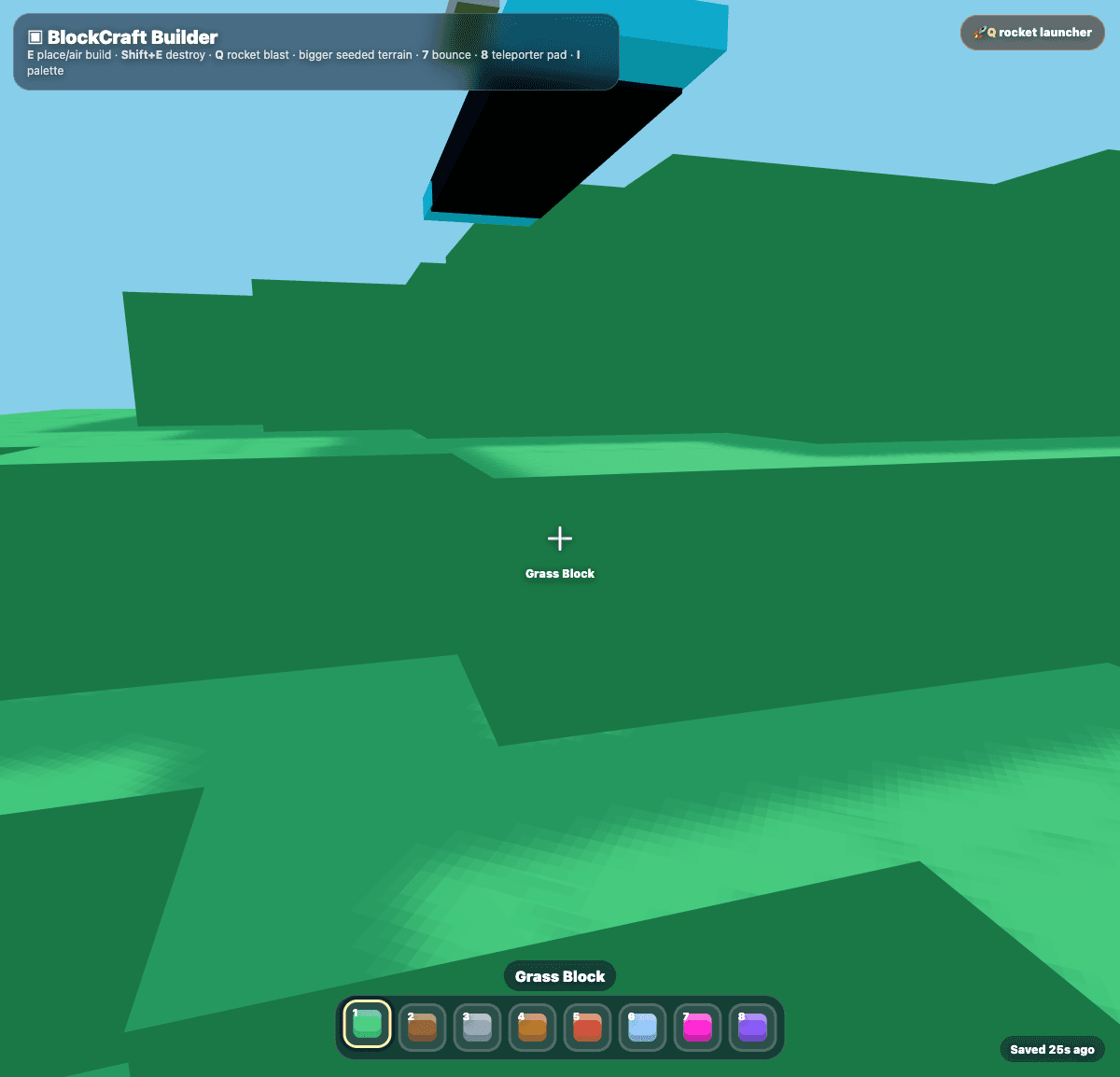
BlockCraft Builder
Bella, age 12
A Minecraft-style 3D sandbox — walk around with WASD, jump, mouse-look, place blocks, knock them out, build houses or towers. Bounce blocks, teleporters, a rocket launcher, and a mobile control layer. Real Three.js.
Spark gets stronger every week.
Real builds from real kids drive what we ship next. Here's what landed in the last few days.
Real 3D games
First-person mouse-look, chase-cam racers, Minecraft-style block sandboxes. Real Three.js geometry — not a flat canvas pretending. Ask for a driving game, get a driving game.
Real Pokémon trading cards
Pulls actual high-res card art straight from the official Pokémon TCG API. Build a card matching game, a deck-builder, a Pokédex — with the real images, not stand-ins.
Character art that looks right
Ask for "a young Jedi with a blue lightsaber" or "a sneaky pirate captain" and Spark generates real painted-movie-poster art that fits — no awkward "I can't draw that" refusals on style asks.
Spark tells the truth when stuck
When something breaks, the build itself reports the actual error ("the network blocked api.pokemontcg.io") and Spark addresses it directly — instead of saying "fixed it!" three turns in a row while nothing changes.
"Ask Spark to fix it" button
When a build hits a real error, a single tap sends the full error context to Spark and it tries a different approach. The kid doesn't need to know any of the technical details.
15 bite-sized AI lessons
60–90 second reads. Three tracks: talking to AI well, how AI thinks, and being a smart AI user. Real AI literacy in plain English — the lessons transfer to ChatGPT, Claude, anything they'll use next.
Most of these landed in the last 72 hours. We ship daily.
vs. the alternatives
Why not just ChatGPT?
ChatGPT is for adults doing adult work. SafeSpark is the version where a kid can actually build, share, and be safe.
| Feature | ChatGPT | Random AI chatbot | SafeSpark |
|---|---|---|---|
| Account holder | Kid signs up | Kid signs up | Parent — kid uses family code |
| Live playable result | Text only | Text only | Real running app/game |
| Hard-topic redirect | Will engage | Often unsafe | Routes to parent |
| Image restyle | No kid filter | Sometimes blocked | Kid-safe + moderated |
| Parent visibility | None | None | Full dashboard |
| Share with friends | Whole chat | Awkward | One-tap share link |
| Made for ages 10–13 | Adult tool | All ages | Designed for tweens |
How it's different
Built for making, not chatting.
Talk to it
Tap the mic, say what you want. Spark types so kids who hate typing still build.
Real AI images
Upload a photo, ask for a Pixar / Lego / anime restyle. Spark generates real character sprites for game art too.
Nothing is lost
Every build saves a version. One-tap undo, 30-day recycle bin, projects roam across devices.
Real-world facts
Flashcards for state capitals get real capitals. Pulls Wikipedia automatically. No hallucinated homework answers.
Share, don't post
One-tap private share links to send a project to grandma. No public gallery, no follower counts.
The AI is on a leash
Style requests redirect. Hard topics route to parents. Image restyles strip unsafe modifiers.
Made for families
One parent account. Every kid gets their own profile.
Same pattern as the other Safe Family apps. Parent signs up with email, gets a 6-character family code, and kids log in on their device with that code — no separate accounts to manage.
Family code login
Kid types a 6-character code at /start, picks their profile, optional PIN. No password. No email.
Multiple kids per family
Add each kid as a profile under your account. Every project they make attributes to them — siblings stay separate.
Parent dashboard
See every kid's projects, every prompt, monthly usage, and what they've been making. At /parent.
Safe by default
The AI is on a leash.
No social-media patterns. No gambling. No violence or gore. No collecting private information. SafeSpark redirects to safe alternatives instead of refusing — so kids can keep building.
Hard topics like sex ed and identity get routed back to parents — that's your job, not the AI's.
Image restyles strip unsafe modifiers before they hit the AI.
OpenAI moderation runs as a second layer on every image.
No browsing — Spark only reads from safe public sources like Wikipedia.
Projects save under the parent's email account, not a random kid login.
Stop button cancels any generation mid-stream.
Why I Built This

Jeremiah Daws
Teacher, Software Developer, Parent
Every kid I know is going to use AI. The only question is whether they pick up good habits or bad ones along the way.
ChatGPT will engage with anything. Random chatbots have no guardrails. School “coding class” can't move fast enough to keep up. So kids are learning AI from whatever ad pops up — and they're learning to consume AI instead of direct it.
So I built something better — real making, with real protection.
SafeSpark isn't a kid chatbot. It's a sandbox where a 10-13 year old asks for a game, a poster, a flashcard set — and the AI builds it. They learn the skill of directing AI clearly, checking what came back, iterating until it's right, and owning the final result.
I hope it helps your kid the way I wish it had existed for me.
Early-access feedback
What parents are seeing.
We're early-access. Real quotes from the first families using SafeSpark.
“The first kid I handed SafeSpark to went from 'make a game' to a 129-message-deep Mando combat sim that his friends are still playing a week later. The iteration loop is the lesson.”
Jeremiah Daws
Founder · Safe Family
“[Coming soon — early-access parents are testing now]”
—
Reserve this spot · email jeremiah@getsafefamily.com to share yours
“[Coming soon — early-access parents are testing now]”
—
Reserve this spot · email jeremiah@getsafefamily.com to share yours
Pricing
Free during early access.
We're not charging yet. When paid plans launch we'll show the price clearly and ask before charging — no auto-renew surprises, no credit card on file.
Free
Early access
$0
What you get right now
- Unlimited kids in your family
- Reasonable monthly usage
- Full feature access
- Parent dashboard
Coming soon
Family
TBD
We'll email you the price before launch
- Everything in Free
- Higher monthly usage cap
- Priority support
- No ads, ever
Schools
Class / Co-op
Email us
Hands-on AI for classrooms
- Bulk family codes
- Teacher dashboard
- Curriculum support
- Volume discount
FAQ
The parent questions we hear most.
Does my kid need their own account?+
What ages is it for?+
What does it cost?+
Is it COPPA compliant?+
What if my kid asks about something unsafe?+
Can teachers or schools use it?+
What devices does it work on?+
Can my kid share what they made?+
Can it really make 3D games?+
Does it use real images for things like Pokémon and country flags?+
More questions? jeremiah@getsafefamily.com
Let your kid build something today.
One parent email. Multiple kid profiles. Every project saved under your account and reachable from any device.
Sign up freeFree during early access · No credit card · Cancel any time